Zebill for the UAE
VAT invoicing for UAE businesses, in English and Arabic
Make tax invoices with your TRN and optional Arabic headings, handle standard, zero-rated, exempt and reverse charge supplies, and get your VAT 201 figures ready to copy into EmaraTax.
UAE features
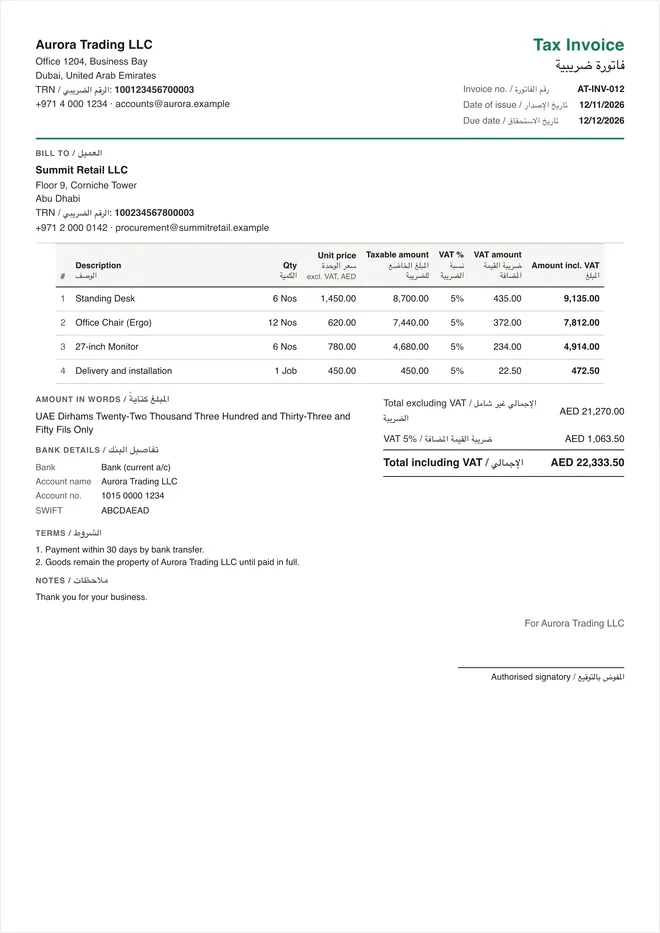
Tax invoices
Your TRN, the customer’s TRN, VAT per line and totals in AED.
Arabic headings
Labels in English and Arabic, side by side, when you need them.
VAT categories
Standard 5%, zero-rated, exempt, out of scope and reverse charge.
AED and more
Invoice in AED or another currency; VAT stays in AED.
VAT 201
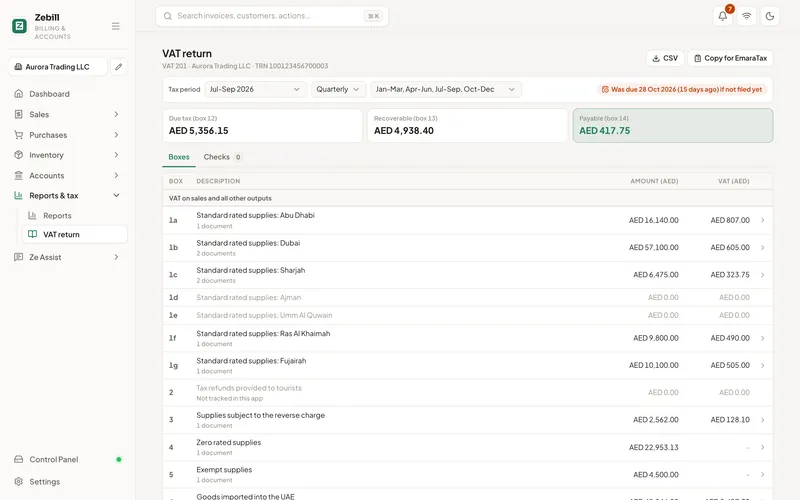
Your VAT return figures, box by box
Zebill works out the VAT 201 return from your invoices and purchases: standard rated supplies by emirate, zero-rated and exempt supplies, reverse charge, and recoverable input tax. Each figure is ready to copy into EmaraTax.
- Boxes 1a to 1g split by emirate
- Reverse charge supplies in box 3 and recoverable input in box 10
- Zero-rated and exempt supplies in boxes 4 and 5
- The return due date shown up front
Everything else, too
The full Zebill toolkit, set up for the UAE
Stock, purchases, payments, bank matching, reports, Ze Assist and thermal receipts all work the same for a UAE business. India-only tools such as GST returns and e-way bills stay out of your way.
- Quotations, proformas, sales orders, delivery notes and credit notes
- Purchase bills with input VAT, ready for the return
- Thermal receipts for shops and restaurants
- Ze Assist reads supplier bills in a draft you confirm
See Zebill for the UAE in 94 seconds
Common questions
Does Zebill make FTA-compliant tax invoices?
Zebill prints the details the FTA asks for on a tax invoice: the words "Tax Invoice", your name, address and TRN, the customer’s TRN where they are registered, a sequential number, the date of issue and supply, a description of each line, the VAT rate and amount, and totals in AED. Check the latest requirements on the FTA website, and see our UAE tax invoice guide.
Can I show Arabic on the invoice?
Yes. Turn on Arabic headings and the invoice labels print in English and Arabic side by side. Your item descriptions stay as you type them.
Does Zebill file my VAT return?
No. Zebill prepares the VAT 201 figures box by box, split by emirate, with values you can copy into EmaraTax. You file the return on EmaraTax yourself or through your tax agent.
Can I invoice in USD or other currencies?
Yes. Invoice in any currency with an exchange rate, and Zebill keeps the AED values the VAT return needs.
What about reverse charge and zero-rated exports?
Each line can be standard rated, zero-rated, exempt or out of scope, and an invoice can be marked reverse charge. They go to the right VAT 201 boxes automatically.
VAT invoicing in every emirate
Free zones, local trades and VAT basics for your emirate.
Guides and articles
All articles- GuideUAE VAT registration: thresholds, documents and steps6 min
- GuideUAE VAT 201 return explained, box by box6 min
- GuideUAE tax invoice requirements (FTA)6 min
- GuideReverse charge in UAE VAT: imports and foreign services5 min
- GuideZero-rated exports under UAE VAT: rules and proof4 min
- GuideUAE tax credit notes: when to issue one and what it shows3 min
Ready for your next VAT period
Zebill is free while we are in early access. Set up your UAE business with your TRN and emirate in a few minutes.