GST and compliance
Find GST mistakes before you file, not after a notice
Zebill checks your invoices and purchases for the problems that cause rejected returns and lost input credit, prepares your GSTR-1 and GSTR-3B summaries, and helps you match GSTR-2B.
- Valid GSTIN on every B2B invoice
- HSN or SAC on every line
- No gaps or repeats in invoice numbers
- Place of supply on big B2C bills
- Exports carry a LUT or IGST
- Totals add up on every invoice
- Crestline SuppliesCS/1187Amount differsMatched
- Northstar DistributorsND-0451Number differsMatched
- Maple Office SolutionsMOS/2210Not in booksAdded
- Atlas EngineeringAE-778Not in 2BFollow-up sent
Checks before filing
Eleven checks, one click
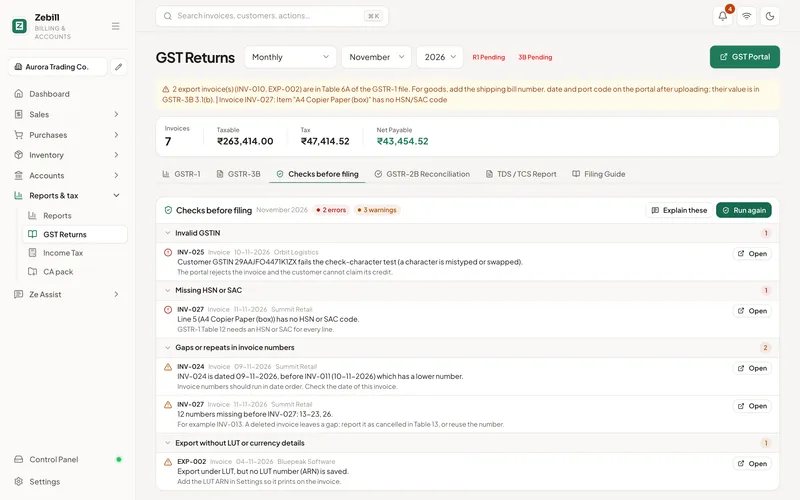
Run the checks for a month or quarter and Zebill lists every problem with the invoice it is on and how to fix it. Errors first, then warnings.
- Wrong tax typeCGST and SGST on an inter-state sale, or IGST on a local one.
- Invalid GSTINA GSTIN with the wrong format or check digit.
- Missing HSN or SACLines without the code GSTR-1 needs.
- Unusual GST rateA rate that is not one of the GST slabs.
- Big B2C bill without place of supplyLarge inter-state sales to consumers that need it.
- Duplicate supplier billThe same purchase entered twice.
- Gaps or repeats in invoice numbersBreaks in your series that need explaining.
- Credit note issuesNotes without a linked invoice, or larger than it.
- Export without LUT or currency detailsZero-rated exports missing what makes them valid.
- Totals do not add upSaved totals that differ from the lines.
- Purchase credit at riskInput tax credit you may not be able to claim yet.
Returns
GSTR-1 and GSTR-3B, ready to review
B2B, B2C large and small, exports, credit notes, the HSN summary and document summary are worked out from the invoices you already made. Download the GSTR-1 JSON for upload, and copy the GSTR-3B figures table by table.
- Same numbers as your printed invoices, worked out the same way
- Input tax credit set off against output tax in 3B
- Composition and bill of supply handled
- Exports with and without payment of IGST, under LUT
GSTR-2B mismatch helper
Match 2B to your purchase register in minutes
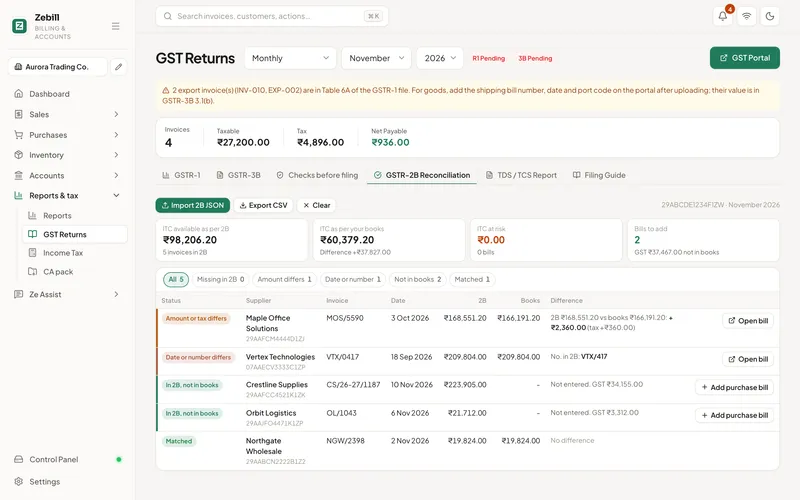
Open the GSTR-2B JSON from the GST portal and Zebill pairs every supplier invoice with your purchase bills. You see what matches, what differs and what is missing, and how much input credit is at risk.
- Amount differs: see the exact difference in taxable value and tax
- Date or number differs: usually a typing slip, fix it in one place
- Missing from 2B: a ready-to-send WhatsApp or email to the supplier
- Not in your books: add the bill you have not entered yet
Also included
E-invoice support
Prepare the e-invoice JSON for the IRP, then print the IRN and signed QR on your tax invoice.
E-way bill file
Download the e-way bill file for goods you send, ready to upload on the e-way bill portal.
TDS and TCS
Record tax deducted or collected and see it in one report, ready to reconcile.
GST rules and portal formats change. Zebill follows the current formats, but check the latest on the GST portal before you file.
How a GST month runs in Zebill, step by step
- Bill through the monthInvoices, credit notes and purchase bills collect the fields the returns need: GSTIN, HSN or SAC, place of supply and tax split.
- Run the checksOpen the checks and clear the flagged items, such as a wrong tax type, a missing HSN or a gap in invoice numbers.
- Review GSTR-1 and GSTR-3BLook at the summaries and compare them with what you expect from the month’s sales and purchases.
- Match purchases with GSTR-2BDownload the JSON from the GST portal and open it in Zebill to see which supplier invoices match, differ or are missing.
- Hand over and fileDownload the GSTR-1 JSON or send the pack to your CA. Filing itself happens on the GST portal, by you or your CA.
Who uses it, and for what
- A trader with mixed rates. Sells goods at 5%, 12%, 18% and 28% in one bill and needs the return to show each slab correctly.
- A service business. Bills clients in other states and needs the IGST and place of supply to be right on each invoice.
- A buyer who depends on input credit. Uses the GSTR-2B match to spot suppliers who have not reported an invoice yet.
- An exporter. Needs the LUT and currency details on every zero-rated invoice and a clean export section in the return.
- A business that gets TDS deducted. Records tax deducted by customers and reconciles it with Form 26AS later.
- A CA or bookkeeper. Reviews the same checks the owner saw, and spends the time on judgment, not on retyping.
The GST rules behind the screens
GST is a destination-based tax. If you supply within a state, CGST and SGST apply, split equally. If the place of supply is in another state, IGST applies. For goods, the place of supply is generally where the goods are delivered. For services, the rules differ by type, so the customer’s location is a starting point, not the final answer.
GSTR-1 reports your outward supplies, by invoice for business customers and in summary for most consumer sales. GSTR-3B is the summary return where you declare your tax liability and the input tax credit you claim, and pay the tax. Zebill prepares the summaries and the GSTR-1 JSON, and you file on the portal.
Input tax credit generally depends on you holding a valid tax invoice, receiving the goods or services, the supplier having filed and reported the invoice, and the tax having actually been paid. That is why the GSTR-2B comparison matters. A mismatch is not always an error. It can simply be a supplier who files late.
Late fees and interest apply when returns or tax are late, and due dates and rates are revised by notification. Treat any date or rate you remember as provisional and check the GST portal.
What each GSTR-2B result means
| Result | What it usually means | What to do |
|---|---|---|
| Matched | Supplier invoice and your bill agree | Claim as planned |
| Amount differs | Totals or tax are different | Compare with the paper bill, then ask the supplier or correct yours |
| Date or number differs | A typing difference in the invoice number or date | Fix your entry or ask the supplier to correct theirs |
| Missing from 2B | Supplier has not reported it, or reported it later | Follow up with the supplier before claiming |
| Not in your books | In 2B but you never entered it | Check whether it is yours, then enter it or raise it |
Tips to get the most out of GST
- Run the checks weekly, not monthly. Ten small fixes a week are easier than a hundred on the last day.
- Keep invoice numbers continuous. Gaps are flagged because an officer may ask about them. Note why on the invoice list if a number was cancelled.
- Hold credit until it matches. If a supplier is missing from 2B, ask before you claim. It is cheaper than reversing credit later.
- Send your CA the month, not the year. Early questions get answered while the transactions are still fresh in everyone’s mind.
- Re-check rates after any notification. If the rate on a product changes, update the product so new invoices pick it up.
Common questions
Does Zebill file GSTR-1 or GSTR-3B for me?
No. Zebill prepares the GSTR-1 and GSTR-3B summaries and the GSTR-1 JSON file. You or your CA upload and file on the GST portal.
How does the GSTR-2B helper work?
Download your GSTR-2B JSON from the GST portal and open it in Zebill. It compares every supplier invoice with your purchase bills and sorts them into matched, amount differs, date or number differs, missing from 2B and not in your books.
Can Zebill generate e-invoices and e-way bills?
Zebill prepares the e-invoice JSON and the e-way bill file for you to upload on the government portals. It does not connect to those portals itself. After uploading, you enter the IRN, acknowledgement and signed QR code in Zebill so they print on the invoice.
Does it handle TDS and TCS?
Yes. You can record TDS deducted by customers and TCS where it applies, and see them in a TDS/TCS report for reconciliation with Form 26AS.
Are the GST rates kept up to date?
Zebill suggests rates and flags unusual ones, but GST rates and rules change. Always check the latest on the GST portal or with your CA before filing.
Does Zebill handle composition scheme businesses?
A business under the composition scheme issues a bill of supply and does not charge tax on it. Zebill supports the bill of supply document. Confirm with your CA whether composition fits your turnover and business.
Can I file a nil return from Zebill?
Zebill does not file returns. It prepares summaries and files you take to the GST portal. If you had no sales, the summaries will show that, and you or your CA file the nil return there.
How should I handle a credit note after the month closed?
Issue the credit note linked to the original invoice. When it is reported in a return depends on the date and the rules for amendments, so ask your CA, who will know the current position.
What about reverse charge purchases?
Reverse charge applies to specific supplies and suppliers. Because it changes who pays the tax, confirm your case with your CA before relying on any default treatment.
Guides and articles
All articles- GuideGSTR-1 vs GSTR-3B: what each return is and when it is due5 min
- GuideInput tax credit under GST: conditions and blocked credits7 min
- GuideGSTR-2B vs purchase register: fixing mismatches8 min
- GuideCGST, SGST and IGST: which one to charge, with examples5 min
- GuideReverse charge under GST: when the buyer pays the tax5 min
- GuideUAE VAT 201 return explained, box by box6 min
File with confidence this month
Zebill is free while we are in early access. Set up your business in a few minutes and make your first invoice.