Billing software for small business
AI billing software for small businesses
Zebill makes your invoices, tracks who has paid, keeps stock and books in step, and has an AI assistant that enters your purchase bills for you to check. Built for small businesses anywhere, with GST and VAT built in.
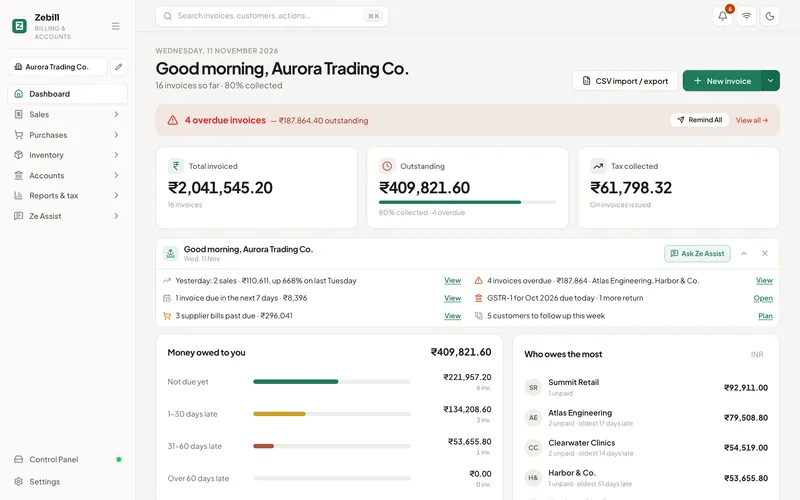
One app for the money side of the business
Invoices and quotes
Tax invoices, quotations, proformas, delivery notes and credit notes, numbered for you, in any currency.
Payments and dues
Who has paid, who owes what and since when, with reminders ready to send.
Stock
Every sale and purchase moves stock, with batches, expiry and reorder suggestions.
Purchases and expenses
Supplier bills and running costs, so profit is real profit.
Books
Ledgers, trial balance, profit and loss and balance sheet, kept as you work.
Tax
GST for India and VAT for the UAE built in, with checks before you file.
AI built in
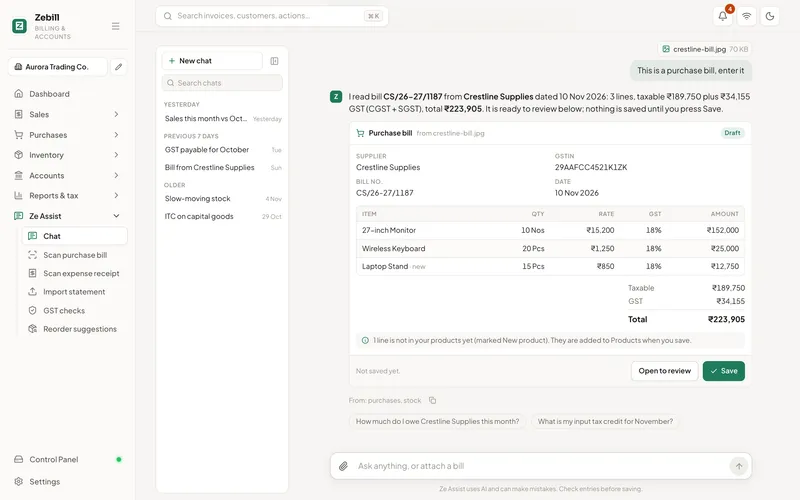
An assistant that does the typing, and waits for your click
Attach a supplier bill, a receipt or a bank statement and Ze Assist fills a draft with the supplier, lines and tax. Ask “who owes me the most?” and get a table. Nothing is saved until you say so.
- Purchase bills and receipts from a photo or PDF
- Bank statements into matched entries
- Plain-English questions about sales, dues and stock
- Off until you switch it on; it only reads what you send
Works the way a small business works
Any currency
Invoice clients at home and abroad.
Offline
Billing never stops for a bad connection.
Your data
Safe in the cloud and backed up, encrypted, with roles for your team.
Your team
Roles from Owner to Viewer, and an audit trail.
Tax built in where it matters: GST billing for India and VAT invoicing for the UAE.
How to choose billing software: eight questions
- Does it get the tax right on its own?It should work out the tax on every line from the customer and the product, not leave it to a formula you maintain.
- Can you trust the numbering?Invoice numbers should be consecutive and impossible to reuse by accident.
- Does it know who owes you?Billing without payment tracking is half the job.
- Does stock follow sales?If you sell goods, stock should move when you bill, not at month end.
- What happens without internet?A shop cannot stop billing because the connection dropped.
- Where does your data live, and can you get it out?Backups you control, and exports your accountant can open.
- Does the AI save anything on its own?Helpful AI drafts; you decide. Nothing should be saved without your click.
- Can your accountant work with it?Reports and a month-end pack your accountant can use without retyping.
Still on a spreadsheet? Read billing software vs spreadsheets. Need one invoice right now? Use the free invoice generator.
Common questions
What is billing software?
Billing software makes invoices and keeps a record of them: who you billed, for what, the tax, and whether they have paid. Good billing software also keeps stock, purchases and books in step, so the numbers agree without retyping.
What does the AI in Zebill actually do?
Ze Assist reads a purchase bill, receipt or bank statement you attach and fills a draft entry for you to check. It also answers questions about your business in plain English, such as who owes you the most, with a table or chart. It never saves anything by itself; every draft waits for your click.
Can I use Zebill outside India and the UAE?
Yes. Invoices in any currency, payments, stock, purchases and books work everywhere. The tax return features, such as GST returns and the VAT 201 summary, are built for India and the UAE.
Does Zebill work offline?
Yes. Billing, printing and receipts keep working without internet. Changes are saved on the device, encrypted, and upload by themselves when you are back online.
How much does it cost?
Zebill is free while in early access. Paid plans will come later, and we will say clearly before anything changes. See pricing.
Start billing with Zebill today
Zebill is free while we are in early access. Set up your business in a few minutes and make your first invoice.