Books, reports and CA pack
Reports you understand. A hand-over in one click.
Books, ledgers and a trial balance kept for you as you work, profit by product and by customer, and a one-click CA pack with everything your accountant asks for each month.
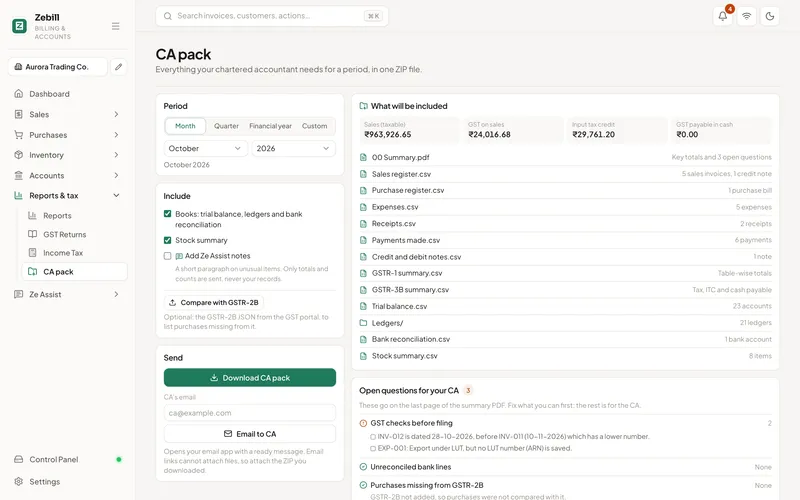
What is in the CA pack
Sales and purchase registers
Every invoice, credit note and supplier bill for the period, as spreadsheets.
Tax summaries
GSTR-1 and GSTR-3B summaries, and purchases missing from GSTR-2B when you add it.
Bank and cash
Bank lines and the cash book for the period.
Expenses
Every expense with its category and tax.
Books
Ledgers and trial balance, if you keep books in Zebill.
Summary PDF
One page with the totals and open questions for your accountant.
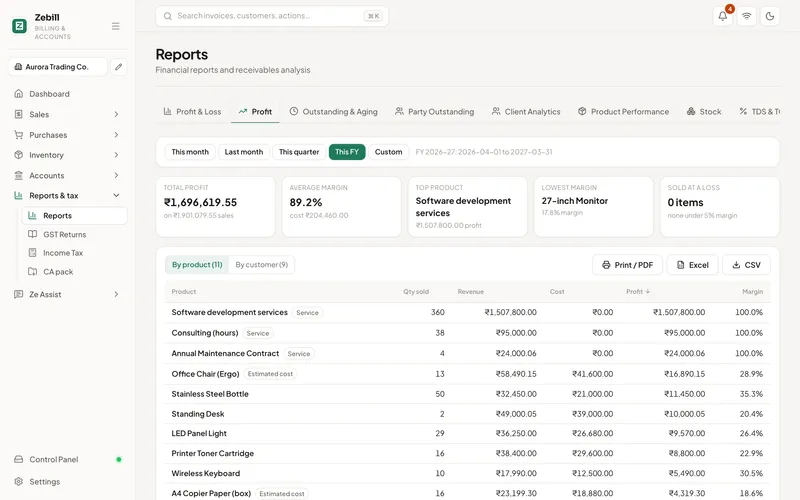
Profit
Which products and customers really make you money
Profit by product uses what each item cost you, so a best seller with thin margins shows up for what it is. Profit by customer shows who is worth the discount.
- Profit and loss for any period
- Profit by product and by customer
- Outstanding and ageing
- Sales by month, product and customer
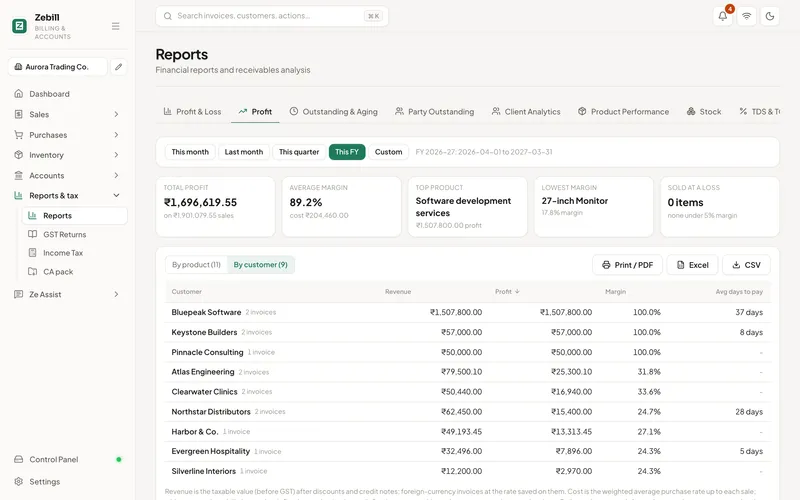
By customer
Margins by customer, side by side
See revenue, cost and margin for every customer, and spot the ones you are serving at a loss.
Month-end in five steps
- Clear the open itemsLook at invoices not yet recorded, bills not yet entered, and bank lines not yet matched. The summary PDF lists open questions for the same reason.
- Choose the periodSelect the month, quarter or year your accountant needs.
- Click once for the CA packZebill assembles the registers, tax summaries, bank and cash, expenses, books and the summary into one ZIP.
- Look before you sendOpen the summary PDF and check the totals. If something looks odd, fix it and download again.
- Hand it overSend the ZIP, or invite your CA so they can download it themselves from the CA portal.
Who uses it, and for what
- An owner who wants to know if the month was good. Reads profit and loss before reading anything else.
- A retailer with thousands of items. Uses profit by product to see which best sellers are barely paying for themselves.
- A service business with a few big clients. Uses profit by customer to see who deserves a discount and who costs more than they pay.
- A bookkeeper. Starts from the trial balance and ledgers instead of building them from scratch.
- A CA preparing returns. Gets registers, tax summaries and the bank file in one package, not in six emails.
- A business seeking a loan. Hands the bank a profit and loss and balance sheet that come from the same records as the tax returns.
The accounting ideas behind the reports
Double-entry means every transaction touches at least two accounts and the totals always balance. An invoice increases a receivable and a sales account, and the tax account. A payment reduces the receivable and increases the bank. The trial balance lists all account balances and its debits must equal its credits. If they do not, something is wrong in the entries.
Profit and loss shows income less expenses for a period. The balance sheet shows what you own, what you owe and what is left for the owner on one date. These two connect through the profit that rolls into the owner’s equity.
Profit on goods depends on cost. Profit by product uses what each item cost you. If purchase prices on your products are missing or stale, margins will be overstated or understated, so keep them current.
Records generally have to be kept for several years. In India, GST law asks for records for a set number of years after the annual return, and the UAE has its own retention rules for tax records. The exact period can change, so ask your CA, and download the CA pack at each year end as an archive.
What your accountant asks for, and where it is
| They ask for | In the pack | Used for |
|---|---|---|
| Sales register | Sales and purchase registers | GSTR-1 and VAT output |
| Purchase register | Sales and purchase registers | Input tax claim |
| Tax summary | GSTR-1, GSTR-3B summaries | Checking the return before filing |
| Bank statement lines | Bank and cash | Reconciliation |
| Expense list | Expenses | Deductions and input tax |
| Trial balance and ledgers | Books | Finalising accounts |
| Open questions | Summary PDF | Clearing doubts before filing |
Tips to get the most out of reports
- Send the pack on the same day each month. A fixed date gives your accountant a fixed rhythm and fewer reminders.
- Keep purchase prices current. Margins are only as good as the cost behind them.
- Read profit by customer once a quarter. Do it before price reviews, not after.
- Use the summary PDF as your own checklist. The open questions are the same ones your accountant would raise later.
- Archive each year’s pack. Store the annual download somewhere other than the laptop you work on.
Common questions
What is the CA pack?
A single ZIP file with everything your chartered accountant usually asks for each month, quarter or year: sales and purchase registers, tax summaries, bank and cash, expenses, books and a summary PDF. You choose the period and click once.
Does Zebill do double-entry accounting?
Yes. Invoices, bills, payments and expenses post to the books, so you get ledgers and a trial balance without extra entries. You can also add journal entries.
Can I see profit by product?
Yes. Profit by product and by customer use what each item cost you, so you can see which products and customers actually make money.
Can I export reports?
Reports export to spreadsheets and PDF, and the CA pack bundles the usual ones together.
Is the CA pack different from the CA portal?
The pack is a download you can send by hand. The CA portal gives your accountant live, view-only access to the same books so they can download what they need.
Can I get reports for a single branch?
Zebill supports branches. Check the report filters in your account to see what you can narrow by, and ask your CA what they need for each registration.
What if the trial balance does not tally?
Because invoices, bills, payments and expenses post automatically, a difference usually comes from a manual journal entry. Check recent journals first.
Can I compare this year with last year?
You can run reports for any period, so run the same report for each year and compare. Check with your accountant what comparison they prefer for filing.
Make month-end the easy part
Zebill is free while we are in early access. Set up your business in a few minutes and make your first invoice.