Payments and banking
Know who owes you, and what came in
Record receipts and supplier payments, plan who to follow up this week, and match your bank statement to your invoices and bills in a few clicks.
Payments features
Receipts and vouchers
Record payments against one or many invoices and print a receipt on A4, A5 or thermal.
Follow-up planner
This week's customers to chase, ordered by what they owe and how they usually pay.
Bank matching
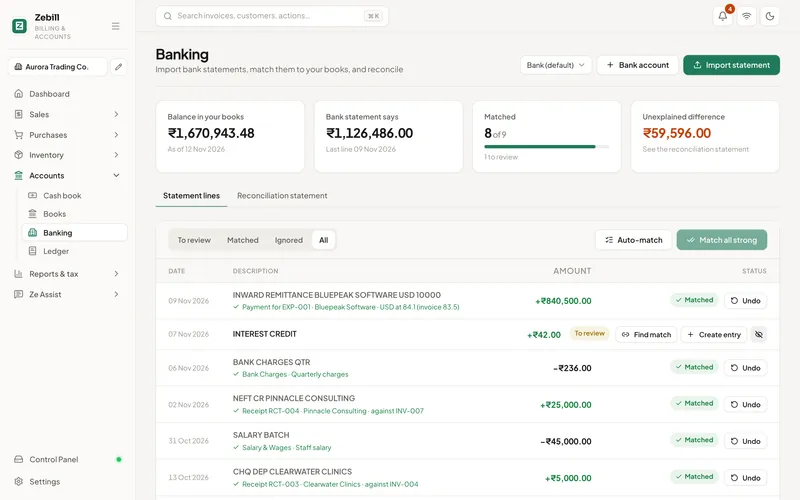
Import a statement and match each line to an invoice, bill or expense.
Cash book
Cash in and out with a running balance you can count against the drawer.
Expenses and tidy-up
Record expenses, and let tidy-up find duplicates, missing categories and missed input tax.
Bills and supplier payments
Purchase bills, purchase orders and payments to suppliers, with what is due next.
Bank matching
Your bank statement, reconciled
Import the statement from your bank and Zebill suggests a match for each line: a customer payment against an invoice, a supplier payment against a bill, a card charge against an expense. Confirm the matches, deal with what is left, and your books agree with the bank.
- CSV, Excel and text statements import directly
- PDF or photo statements through Ze Assist, as a draft
- Find a match or create the entry from the line
- Matched lines stay matched, month after month
Money owed
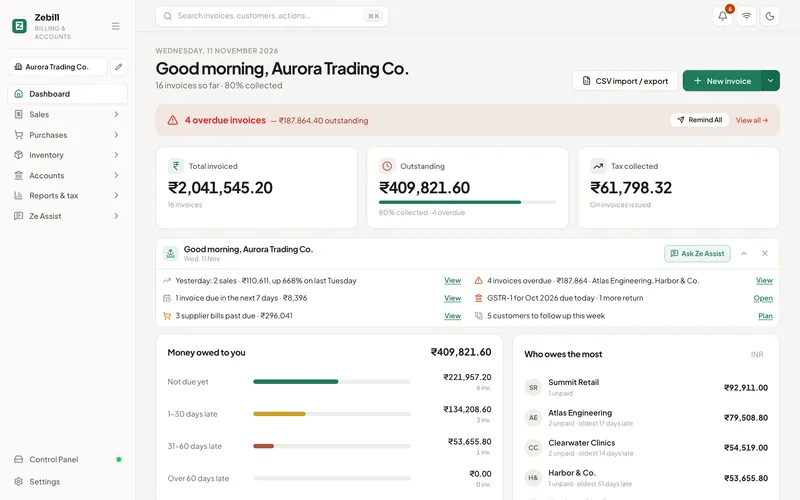
See ageing at a glance, then follow up
The dashboard shows what is outstanding by age, and who owes the most. The follow-up planner turns that into this week's list, with a polite message ready for WhatsApp or email.
A week of collections, step by step
- Open the follow-up plannerSee this week’s customers in order, by what they owe and how they usually pay. Start from the top, not from memory.
- Send a messageEach customer has a ready-written WhatsApp or email message. Read it, change it if you like, and send it yourself.
- Record the receiptWhen money arrives, record the payment against one or many invoices. A part payment leaves the balance open.
- Import the bank statementAt the end of the week or month, import your bank’s file and let Zebill suggest matches for each line.
- Settle what is leftConfirm the suggested matches, then deal with leftovers by finding the right invoice or creating a new entry from the line.
Who uses it, and for what
- A wholesaler with credit customers. Chases the handful of retailers who owe the most each week instead of calling everyone.
- A consultant on monthly retainers. Matches bank credits to invoices so nothing sits as unpaid when it was actually paid.
- A shop that takes cash, UPI and cards. Counts the drawer against the cash book while bank and UPI lines are matched separately.
- A contractor paying suppliers. Records supplier payments, and sees which purchase bills are due next.
- An office manager. Enters petty expenses, and lets tidy-up flag duplicates and missing categories before month-end.
- A UAE trading firm. Reconciles AED receipts against tax invoices and supplier bills with VAT.
The rules behind payments and reconciliation
A bank reconciliation proves that your books and your bank agree. The usual differences are timing (a cheque you issued but the bank has not cleared), charges and interest the bank posted that you have not recorded, and mistakes. After reconciling, every difference should have a known reason.
Recording a payment against the right invoice matters for tax as well as for chasing. In India, if a customer deducts TDS, the amount you receive is less than the invoice, and the difference should be recorded as tax deducted, not as a discount. Otherwise the invoice looks unpaid and your TDS credit goes unclaimed. In India, large cash transactions are also restricted by the Income Tax Act, so a bank or UPI trail is the safer habit. Check the current limits with your CA.
Under GST, if you do not pay a supplier within 180 days of the invoice date, the input tax credit you took on it may have to be reversed. Keeping supplier payments recorded and dated protects you. In the UAE, the VAT rules depend on invoices and supplies, not on when you paid, but a clean payment trail still helps with audits.
Matching: what a bank line can become
| Line on the statement | Matches against | If there is no match |
|---|---|---|
| Customer transfer in | An open invoice | Record a receipt, or keep it as an advance |
| Payment to a supplier | A purchase bill | Record the supplier payment |
| Card or UPI charge | An expense | Create the expense from the line |
| Bank charges and interest | Nothing yet | Create a bank charge or interest entry |
| Cash deposit | The cash book | Record the movement between cash and bank |
| Unknown credit | Nothing yet | Find the customer, then ask them for the invoice reference |
Tips to get the most out of payments and banking
- Ask customers for a reference. A transfer with an invoice number in the narration matches in one click.
- Reconcile weekly if you can. A hundred lines at month-end is a chore, and a dozen lines a week is a habit.
- Make part payments honest. Record what was actually received so the balance on each invoice is true.
- Count the drawer daily. Compare the cash book balance with the drawer at closing and write down the difference, even if it is small.
- Do not send reminders on autopilot. The planner writes the message, but you know which customer needs a call instead.
Common questions
Which bank statement formats can I import?
CSV, Excel and text exports from your bank import directly. PDF statements and photos of statements can be read by Ze Assist, if you turn it on, into lines you check before saving.
How does bank matching work?
Each bank line is compared with your open invoices, supplier bills and expenses by amount, date and reference. Matches are suggested for you to confirm; anything left over can be matched by hand or turned into a new entry.
Can Zebill send payment reminders?
Yes. The follow-up planner lists the customers to chase this week, in order, with a ready-written WhatsApp or email message for each. You choose what to send.
Can I record part payments?
Yes. A payment can be split across several invoices, or part-pay one, and the balance stays open.
Does Zebill track cash?
Yes. The cash book records cash in and out with a running balance, alongside bank and UPI receipts.
What if one bank transfer pays several invoices?
Record the payment and split it across the invoices it covers. Whatever is not allocated stays as an advance or as part of the open balance.
Can I record an advance before I raise the invoice?
Yes. Record the receipt first, then allocate it to the invoice when you make it. Ask your CA how advances are treated for GST in your case.
How should I record TDS a customer deducted?
Record the tax deducted on the payment, so the invoice closes and the TDS shows in the TDS and TCS report for reconciliation with Form 26AS.
Does matching change my bank balance?
No. Matching links a bank line to a record in your books. It does not move money, and your bank remains the source of truth for the balance.
Get paid on time, every time
Zebill is free while we are in early access. Set up your business in a few minutes and make your first invoice.