Thermal printing
Counter bills on 58 mm and 80 mm, in a second
Fast receipts for shops, cafes and counters, with your logo, the tax split and a UPI QR code. Switch to A4 or A5 for business customers without changing anything else.
Thermal printing features
58 and 80 mm
Pick the paper width; the layout adapts.
UPI QR
Customers scan and pay the exact amount.
Scan to bill
Add items with a barcode scanner or camera.
Phone customers
Type a phone number to find or add a regular.
The real thing
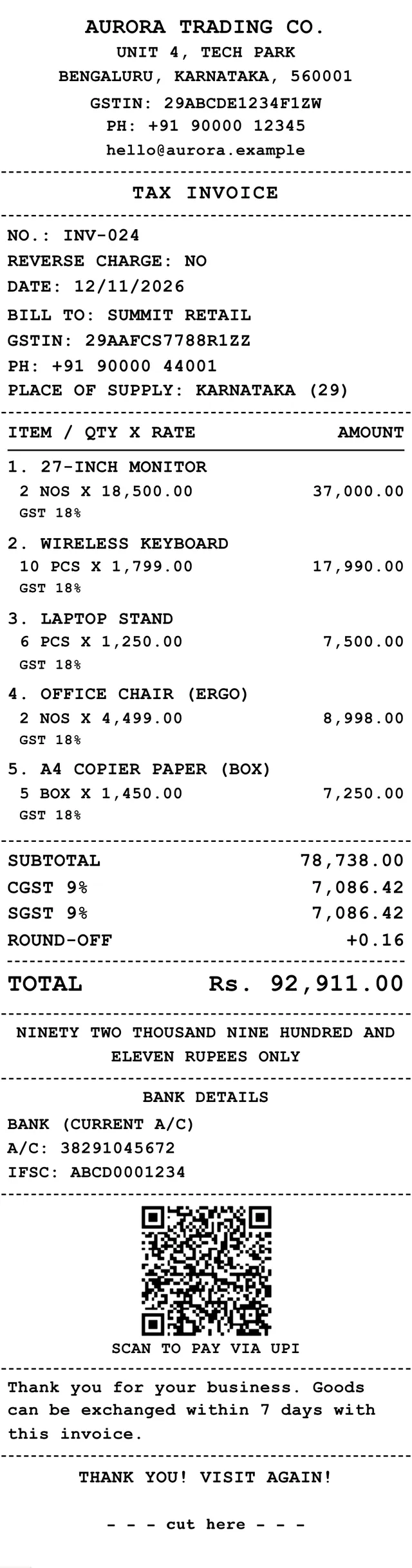
What comes out of the printer
Your business name and tax number, the bill number and time, each item with quantity and rate, the tax split, the total and a QR code to pay. Clear enough to read at arm’s length.
- Your logo at the top, if you want it
- Tax split and totals in a clean block
- A cut mark and a thank-you line
- Reprint any bill from the invoice list
Setting up the counter, step by step
- Connect the printerInstall the printer the normal way on your computer, or pair a Bluetooth receipt printer in the Zebill app.
- Choose the paper widthPick 58 mm or 80 mm in print settings to match the roll in the machine.
- Add your detailsSet your business name, tax number, logo and UPI ID, so they print on every bill.
- Do a test printPrint one bill and check it for cut-off text, small type and a QR that scans.
- Bill all dayScan or tap items, save, and print. Reprint any bill from the invoice list if a customer asks again.
Who uses it, and for what
- A tea stall or small cafe. Prints a short bill in a second so the queue keeps moving.
- A pharmacy counter. Prints a quick bill with the items and tax while the customer waits.
- A kirana or general store. Prints bills for walk-ins and switches to A4 for a business buyer who needs a full tax invoice.
- A salon. Prints the checkout slip with services and the UPI QR so payment is quick.
- A mobile accessories shop. Scans the barcode, prints the bill, and keeps the IMEI on the record for bigger items.
- A UAE grocery. Prints simplified tax invoices with VAT for everyday sales.
What a counter bill has to carry
A thermal receipt is still a tax document. In India, a bill to a consumer should show your GSTIN if you are registered, the bill number, the date, the items with quantity, the tax charged and the total. Rules also differ for small suppliers and for particular types of businesses, so ask your CA if you are unsure which bill type applies to you.
Business customers who want to claim input credit usually need a full tax invoice with their own GSTIN. A thermal bill without the customer’s GSTIN will not give them that. This is the common reason to keep A4 and A5 available beside the thermal printer.
In the UAE, VAT-registered businesses can issue a simplified tax invoice for smaller sales, with a lower threshold of detail than a full tax invoice. The amount at which a full invoice is required is set by the tax authority, so check the current limit. A figure often quoted is AED 10,000, but confirm it before relying on it.
Thermal paper fades, especially in heat and sunlight. If you must keep a bill as a record, keep the saved invoice in Zebill, which holds the permanent copy.
58 mm or 80 mm: which should you choose
| Point | 58 mm | 80 mm |
|---|---|---|
| Typical use | Small stalls, mobile billing | Shops, cafes and restaurants |
| Item name space | Short names fit best | Longer names fit on one line |
| Tax split block | Compact | Easier to read at arm’s length |
| QR code | Smaller, needs a good printer | Larger and easier to scan |
| Paper cost | Cheaper rolls | Slightly dearer rolls |
| Portability | Fits a small Bluetooth printer | Often a counter printer |
Tips to get the most out of thermal printing
- Keep spare rolls by the counter. Running out in the evening rush is the usual cause of lost sales time.
- Shorten item names. A short name prints cleanly on 58 mm and saves paper.
- Test the QR with a real phone. Scan the printed code with a UPI app before the first customer does.
- Clean the print head. A faint print is often dust on the head, not a faulty printer.
- Print the thank-you line once. Short and friendly beats a long message nobody reads.
Common questions
Which thermal printers work with Zebill?
Zebill prints through your computer’s normal printer driver, so most 58 mm and 80 mm receipt printers that work with Windows or macOS will work. Pick the paper width in print settings and do a test print.
Does a thermal bill count as a tax invoice?
A thermal bill from Zebill carries your GSTIN, the bill number and date, items with tax, and the tax split, which suits sales to consumers. For business customers who claim input credit, an A4 or A5 tax invoice is usually clearer. Check with your CA for your case.
Can I print a UPI QR on the receipt?
Yes. Add your UPI ID and a QR code with the bill amount prints at the bottom of the receipt.
Can I print payment receipts on thermal too?
Yes. Payment receipts and vouchers print on A4, A5 and thermal, with the time of payment.
Why does my receipt print too small or cut off?
Check that the paper width in Zebill matches the roll, and that the printer driver is set to the same width. A test print usually shows which setting is off.
Can I print without a computer?
In the Zebill app, Bluetooth receipt printers work from the phone or tablet, so you can bill and print without a computer at the counter.
Can I print a copy for the customer and one for me?
You can reprint any bill from the invoice list. Choose a watermark like Copy if you want to tell the two apart.
Is the logo required on a thermal bill?
No. The logo is optional. A simple, high-contrast logo prints most clearly on thermal paper, and you can leave it off if you prefer a plain bill.
Faster bills at the counter
Zebill is free while we are in early access. Set up your business in a few minutes and make your first invoice.