AI-powered billing and accountingFree for 3 months, for everyone
Billing, payments and your books.
Calm, clear, done.
Zebill is AI-enabled software for invoicing, payments, stock and accounts. Ze Assist reads your bills, answers your questions and drafts entries. Nothing is saved until you click.
- Every feature free for 3 months, no card needed
- Multi-currency
- GST and VAT built in
- Works offline


Why we built Zebill
Running a business should not mean running five apps
Most small businesses we met ran billing in one app, accounts in another, GST in a spreadsheet and everything else on WhatsApp. Every month-end meant retyping, chasing papers and hoping the numbers matched. We built Zebill so that one place does it all, and an assistant does the typing.
The usual way
- Bills in one app, accounts in another, GST in a spreadsheet
- Typing every supplier bill by hand, line by line
- The CA chasing you for papers at every month-end
- Stock that never matches the shelf
- Salaries, leads and customer messages in notebooks and WhatsApp
With Zebill
- Billing, books, GST or VAT, stock, payroll and CRM in one place
- Photograph a bill and Ze Assist drafts the entry for you to check
- Your CA logs in to see the books, view only, or gets the pack in one click
- Every sale and purchase moves stock, with batches, expiry and barcodes
- HR, a sales pipeline and WhatsApp or email templates next to your invoices
Why businesses switch to Zebill
One app instead of five
Invoicing, accounting, GST and UAE VAT, inventory, POS, payroll and HR, a sales CRM and marketing share the same customers, items and books. Nothing is typed twice.
AI that does the typing, not the deciding
Ze Assist reads purchase bills, receipts and bank statements into drafts and answers questions in plain English. Nothing is saved until you click.
Tax done right for India and the UAE
CGST, SGST or IGST picked from the GSTIN, GSTR-1 and 3B summaries, 2B matching, e-invoice and e-way bill files; FTA tax invoices with TRN, Arabic headings and VAT 201 figures.
Keeps working when the internet drops
Bills are saved on your device and upload by themselves when the connection is back, on the web and in the iPhone and Android apps.
Built to work with your CA
Your accountant gets view-only access at no extra seat, or a month-end pack in one click. They see the books, never your customer lists.
Switch without starting over
Bring customers, items, invoices and balances from Tally, Vyapar, Zoho Books, QuickBooks, Excel and more. Rows are checked first, and an import can be undone within 30 days.
Need something made for your business? Done in 24 to 48 hours.
A custom field on your invoice, a report your CA asks for, a print layout or a workflow your trade needs: tell us what you need and we build it into your Zebill within 24 to 48 hours.
Our promises
- Nothing is saved without your click
- Your CA can see, never change
- Export a full backup any time: your data stays yours
- No ads and no tracking cookies
- Custom changes for your business in 24 to 48 hours
- Every feature free for 3 months, no card
Made in Indore, India, by Clarigo Infotech, for businesses in India and the UAE.
See it for yourself
Zebill at work
Real screens from a sample business. Pick a job to see how Zebill does it.

Profit by customer
See which customers bring in real profit, not just sales, once costs are taken off.

Every invoice in one list
Paid, due and overdue at a glance, in any currency, shared on WhatsApp in a tap.

Ze Assist drafts the bill
Photograph a supplier bill; check the draft lines and tax, then save.

GST checks before filing
Missing GSTINs, wrong tax types and mismatches found before your return, not after a notice.

Bank matching
Import the statement and match receipts and payments to invoices and bills.

The CA pack
Sales, purchases, bank, expenses and tax summaries for the month, ready in one click.

Profit by product
See which items actually make money once purchase cost is taken off.

Reorder before you run out
Low stock and slow movers from your own sales, with batches and expiry.

UAE VAT 201 figures
Every box of the return worked out from your invoices and bills, ready for EmaraTax.
- Reads bills, receipts and statementsAttach a photo or PDF and get a draft entry to check.
- Answers in plain EnglishAsk about sales, dues or stock and get a table or chart.
- Drafts payments and entriesType "Northstar Distributors paid 20,000 by UPI" and confirm.
- Checks tax before filingAsk it to run the GST checks and see what needs fixing.
- 7sales document types, from quotation to credit note
- 4paper sizes: A4, A5, 80 mm and 58 mm thermal
- 10team roles, from Owner to Doctor to CA
- 23industry setups with the right fields and defaults
Everything in one place
One app for the whole money side of your business
From the first quotation to the return your CA files, Zebill keeps sales, purchases, stock and tax in step, so the numbers always agree.
Invoicing
Tax invoices, quotations, proformas, sales orders, delivery notes and credit notes, in twelve designs, on A4, A5 or thermal, in any currency.
Learn moreZe Assist
Attach a purchase bill, receipt or bank statement and get a draft to check. Ask about your sales and dues in plain English.
Learn moreTax and compliance
Checks before you file, return summaries ready to review: GSTR-1, 3B and 2B matching for India, VAT 201 for the UAE.
Learn moreInventory and barcodes
Stock across warehouses, batches and expiry, barcodes you can scan with your camera, label printing and reorder suggestions.
Learn morePayments and banking
Receipts and follow-ups, bank statement import and matching, a cash book, expenses and supplier payments.
Learn moreBooks, reports and CA pack
Ledgers, trial balance, profit by product and by customer, and a one-click ZIP of everything your accountant needs.
Learn moreTools for your trade
Built for the way you work, not just the way you bill
A POS for the counter, job cards for the workshop, prescriptions and lab reports for the clinic, bookings for the salon, RA bills for the site, LRs and tracking for transporters, and payroll for everyone.
POS for restaurants and counters
Tables, kitchen orders, cash, UPI and card.
Learn moreProjects
Milestones for IT and services, RA bills for sites.
Learn moreManufacturing and job work
Work orders, production, ITC-04.
Learn moreJob cards for repairs
Repair shops, garages, jewellery work.
Learn moreClinic and diagnostic lab
Consultations, prescriptions, lab reports.
Learn morePayroll
Salary, PF, ESI, TDS, WPS, payslips.
Learn moreSalon and spa
Bookings by stylist, checkout, commission.
Learn moreLogistics and courier
LR, parcels, tracking link, trips, freight bills.
Learn moreTeam and roles
Ten roles, from Owner to CA.
Learn moreHow it works
Set up in minutes. Bill all day. Hand over at month end.
- 1
Tell Zebill about your business
Add your name, GSTIN or TRN and pick your industry. Zebill turns on the right features, invoice fields, units and print style for a pharmacy, a jewellery shop or a consultancy.
- 2
Bill, buy and get paid
Make invoices in seconds, print on A4 or thermal, share on WhatsApp. Let Ze Assist enter purchase bills from a photo. Record payments and match your bank statement.
- 3
File with confidence
Run the checks before filing, review GSTR-1, 3B or VAT 201 summaries, match GSTR-2B and send your accountant a one-click CA pack.
Moving from another app
Switching is easy. Bring your old data with you.
Import customers, products, invoices and opening balances from Tally, Vyapar, Marg, Busy, Khatabook, myBillBook, Zoho Books, QuickBooks, Xero, Odoo, Wafeq, Daftra or any Excel file, in minutes.
- Tally
- Vyapar
- Marg
- Busy
- Khatabook
- myBillBook
- Zoho Books
- QuickBooks
- Xero
- Odoo
- Wafeq
- Daftra
- Excel and CSV
Step 1: Export from your old app
Use the export or Excel option your old app already has. The menu steps for each app are on the import page.
Step 2: Drop the file in Zebill
The file is read on your device. Zebill finds the header row and matches the columns to customers, products and invoices.
Step 3: Check and import
Fix flagged rows, like a GSTIN typo or a missing HSN code, choose to merge or skip duplicates, then import. Undo within 30 days.
Zebill on your phone
Your business in your pocket
The same books on your phone, tablet and the web, always in sync. Bill at the counter, on a site visit or on the road.
Bill from anywhere
Make an invoice or a receipt in seconds and share the PDF on WhatsApp or email.
Scan with the camera
Scan product barcodes to add items, and snap a supplier bill for Ze Assist to fill in.
Keeps working offline
No signal? Keep billing. Everything uploads by itself when you are back online.
Locked and encrypted
Face ID, fingerprint or a PIN, and anything waiting to upload is encrypted on the phone.
Coming soon to the App Store and Google Play. One account works on the web, phone and tablet.
Work with your CA
Your CA sees your books. You stop sending files.
Invite your chartered accountant or tax accountant, and they can file GST or VAT from your live books, view only. Accountants get every client in one free portal.
- Invite onceAdd your CA from Team. No seat used.
- View onlyInvoices, purchases, accounts and returns. Nothing can be changed.
- Your lists stay privateNo customer or supplier contacts, no stock, no settings.
Ze Assist
Send the bill. Check the draft. Click save.
Ze Assist reads a purchase bill, receipt or bank statement you attach and fills in a draft: supplier, GSTIN, items, HSN codes and tax. You check it and save. That is the whole job.
- Ask in plain English. "Who owes me the most?" comes back as a table or chart.
- Type a payment like "Northstar Distributors paid 20,000 by UPI" and get a draft receipt.
- A morning briefing with yesterday's sales, what is overdue and what is due.
- HSN code and GST rate suggestions while you add products.
It only reads what you choose to send, and nothing is saved without your click.
How Ze Assist worksInvoicing
Invoices that look as good as your work
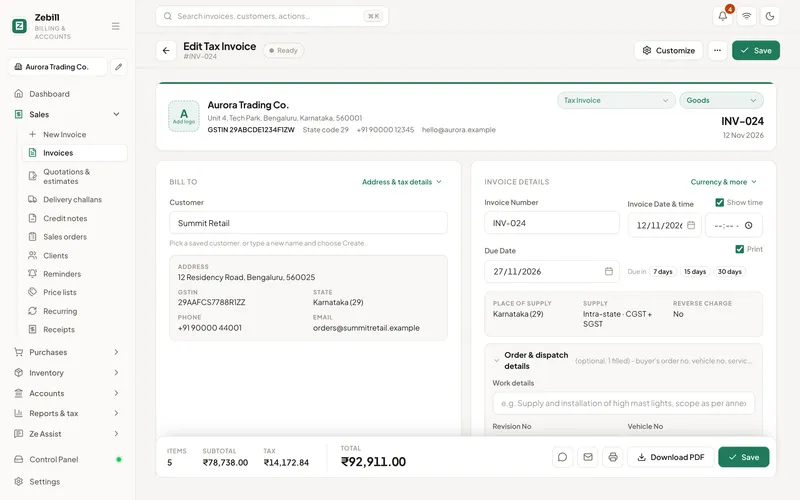
Pick a design, add your logo and UPI QR, and print on A4, A5 or thermal. Zebill works out the tax, the tax summary and the amount in words for you.
- Tax invoices, quotations, proformas, sales orders, delivery notes and credit notes
- Invoice in any currency, with watermarks and the time of issue
- Share on WhatsApp or email, set up recurring invoices and price lists
At the counter and in the stockroom
Print it, scan it, stock it
Fast thermal bills for the counter, barcode labels for the shelf, and stock that knows its batches and expiry dates.
Thermal receipts, 58 mm and 80 mm
Tax details, a payment QR code and your logo on a counter bill that prints in a second. Switch to A4 or A5 for business customers.
Thermal printingBarcodes and labels
Generate barcodes, print shelf labels, and scan with your phone or laptop camera to add items to a bill. Reorder suggestions tell you what to buy.
Inventory and barcodesIndustries
Set up for the way you sell
Choose your industry once and Zebill starts with the right invoice fields, units, tax rate hints and print style. You can change any of it.
Retail and grocery
Quick counter bills, barcodes, UPI QR and reorder alerts.
Pharmacy
Batch and expiry on every strip, drug licence on the bill.
Jewellery
Weight, purity, making charges and HUID, plus repair job cards.
Restaurants and cafes
A POS with tables, kitchen orders and cash, UPI or card.
Wholesale and distribution
Price lists, credit limits, challans and e-way bills.
Services and professionals
SAC codes, recurring invoices, TDS and LUT exports.
Local tax compliance
Tax rules built in, wherever you trade
Zebill speaks the tax language of your country, so invoices are right the first time and returns are a review, not a rescue.
- Valid GSTIN on every B2B invoice
- HSN or SAC on every line
- No gaps or repeats in invoice numbers
- Place of supply on big B2C bills
- Exports carry a LUT or IGST
- Totals add up on every invoice
- Crestline SuppliesCS/1187Amount differsMatched
- Northstar DistributorsND-0451Number differsMatched
- Maple Office SolutionsMOS/2210Not in booksAdded
- Atlas EngineeringAE-778Not in 2BFollow-up sent
FAQ
Questions, answered
Does Zebill do payroll?
Yes. Monthly salary with leave and overtime, PF, ESI, professional tax and TDS for India, the WPS file and gratuity for the UAE, payslips, advances and loans, and the salary posted to your books. See payroll.
Can my staff log in?
Yes, inside the same app. There are ten roles, from Owner and Accountant to Doctor, Lab technician, Technician and your CA, and each sees only what their work needs. See team and roles.
Is patient data private?
Test results and consultation notes are only for doctors, lab staff and the owner; your accountant sees lab bills as amounts only, and every view of a patient record is logged. See clinic and lab.
Is Zebill free?
Zebill is free while we are in early access. Simple paid plans are coming later, and we will tell you clearly before anything changes. See the pricing page.
Does Zebill work without internet?
Yes. Keep making invoices, receipts and payments when the connection drops. Changes are saved on your device, encrypted, and upload to your Zebill account by themselves when you are back online.
What does Ze Assist send, and does it save anything by itself?
Ze Assist only reads what you choose to send it: the bill or statement you attach, or the question you type with short summaries of your records. It never saves on its own. Every bill, payment or entry it prepares is a draft until you click Save.
Can I use Zebill for UAE VAT?
Yes. Zebill makes FTA-style tax invoices with your TRN and optional Arabic headings, handles standard, zero-rated, exempt and reverse charge supplies, and prepares a VAT 201 summary you can copy into EmaraTax. See Zebill for the UAE.
Does it file my GST return for me?
No. Zebill checks your invoices for common mistakes, prepares GSTR-1 and GSTR-3B summaries and the GSTR-1 JSON, and helps you match GSTR-2B. You or your CA then file on the GST portal.
Can my staff and accountant use it too?
Yes. Team roles let you give each person the right access: Owner, Admin, Accountant, Sales, Store or Viewer. You can also send your CA a one-click CA pack each month.
Bill with confidence from today
Zebill is free while we are in early access. Set up your business in a few minutes and make your first invoice.